


TipRanks Stock Market Analysis
4.6487.00 Reviews
App Specs
- Version
- 3.46.1prod
- Updated On
- License
- Free
- Downloads
- 500,000+
- Developer
- TipRanks
- Categories
- Finance
- Platform
- Android, iOS
Screenshots

 Analysis by AppCompare
I tend to judge a stock app less by how many panels it can fit on a screen and more by whether it helps me answer a useful question without turning a quick check into an hour of scrolling. TipRanks Stock Market Analysis is built for that kind of research: it brings together analyst opinions, stock information, portfolio tracking, screening, charts, and market news. I find it most useful as a place to organize and compare ideas, rather than as a shortcut to deciding what to buy.
Getting to Know TipRanks
First things first, let’s talk about what TipRanks Stock Market Analysis actually does. This app is an all-in-one platform for stock market insights. Whether you’re a seasoned investor or just dipping your toes into the world of stocks, TipRanks provides you with comprehensive data to make informed decisions.
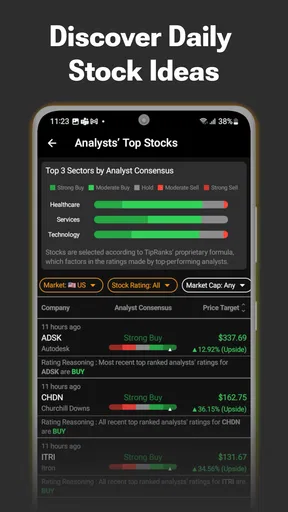
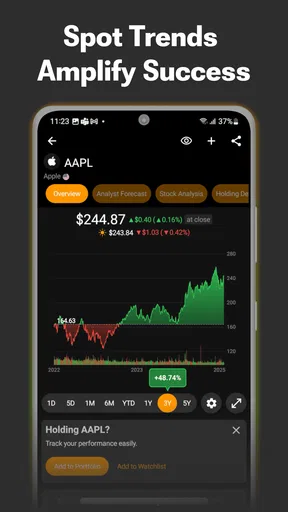
The app’s interface is slick and easy to navigate. You won’t find yourself lost in a labyrinth of menus, which is a blessing when you’re trying to catch up with fast-moving markets. The dashboard is intuitive, giving you a snapshot of market trends, top analysts’ recommendations, and even insider trading activities.
Features That Make a Difference
Now, let’s dive into some of the features that really stood out to me:
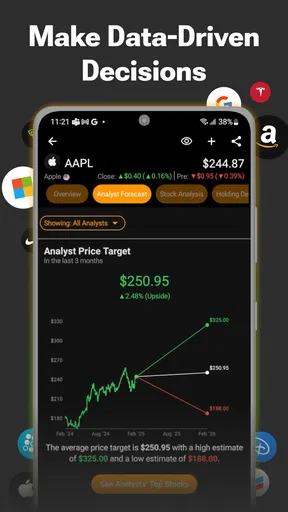
- Analyst Ratings: One of the most valuable features is the analyst ratings. You get to see what the top minds in the industry are saying about specific stocks. The app aggregates these ratings, so you can easily see which stocks are getting bullish or bearish reviews.
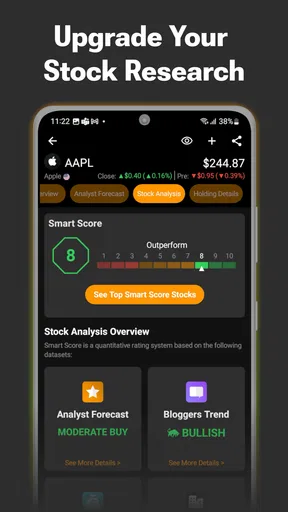
- Smart Score: This feature provides a score for each stock, based on various metrics like technical and fundamental analysis, news sentiment, and more. It’s like having a cheat sheet for stock picking!
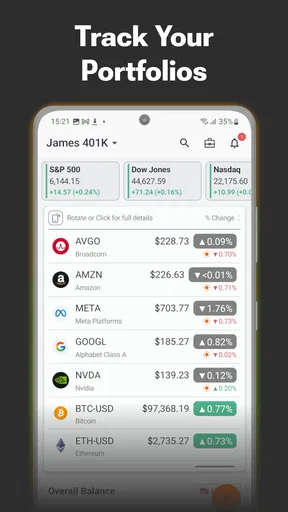
- Portfolio Tracker: Keep track of your investments with the portfolio tracker. It’s straightforward and helps you stay organized without the hassle of spreadsheets.
- Insider Trading Insights: Ever wondered what company insiders are doing? This app gives you access to insider trading activities, so you know when corporate bigwigs are buying or selling their own company's stocks.
Putting Research in Context
A useful way to work through an unfamiliar company is to treat each signal as a prompt for a follow-up, not as a verdict. I might notice a cluster of analyst opinions, then check whether the news and other information shown in the app offer context for that view. If those signals point in different directions, that disagreement is worth noticing; it is not a reason to force a neat conclusion from a single score.
The screener can also help turn a broad interest into a manageable research list. Rather than opening random tickers, I can start with a kind of company or market idea I want to explore, narrow the field, and then inspect the candidates one at a time. That workflow is especially useful when I’m learning a sector, although a screen only reflects the conditions selected. It can leave out companies that do not fit the filters, so I would not treat its results as a complete map of the market.
Real-World Application
Using TipRanks Stock Market Analysis isn’t just for the numbers nerds out there; it’s practical for everyday investors. For example, I recently used the insider trading feature to see that several executives were buying up shares of a tech company I was interested in. That was the nudge I needed to dive in, and it turned out to be a great decision.
Worth Reading Before You Choose

EA SPORTS FC Mobile 26 Is a Bigger Football Game, but It Takes Time

Flipboard Shows What News Apps Must Do Beyond the Feed

Switching to Android Auto Means Rethinking Your Driving Routine

Google Calendar Makes a Crowded Week Easier to Manage

Ludo King Makes the Most of the Minutes Between Plans

Baby Panda World Brings Quick Play to Modern Phones, but Its Game Library Feels Busy
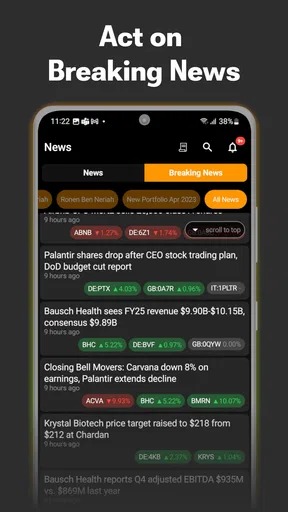
The app also offers real-time alerts, which means you can act swiftly when new information comes to light. Trust me, in the volatile world of stocks, timing can be everything.
A more routine use is a short check during a lunch break: I can review a holding, see whether new coverage or headlines deserve attention, and make a note to research it later rather than reacting immediately. That separation matters. Notifications and fresh commentary can make market activity feel urgent, but not every update changes the long-term case for a company. I prefer to use an alert as a reminder to investigate, then make decisions when I can read carefully.
Speed, Busy Sessions, and Reliability
For quick lookups, the app’s value depends on getting from a ticker to relevant information without unnecessary detours. A combined research workspace can save time compared with switching among a broker, a news app, and a spreadsheet. The trade-off is that several kinds of information compete for attention. When I’m checking multiple stocks or comparing a portfolio with fresh news, I slow down and focus on one question at a time instead of trying to absorb every panel at once.
Like any market app, it is most useful when the information is current and the connection is behaving normally. I would not make a time-sensitive trade depend on a single screen or notification: I’d reopen the relevant stock, confirm the details, and check my brokerage before acting. If a page takes longer to refresh or I lose my place, returning to the specific ticker and reviewing the latest information is a sensible recovery habit. The app is a research companion, not a substitute for confirming an order in the place where it will be placed.
Who Will Get the Most from It
I think the strongest fit is an investor who follows individual companies and wants analyst views, market context, and a simple way to keep an eye on a portfolio in one app. Someone building a watchlist can use it to compare ideas before deciding which deserve deeper research. Newer investors may also appreciate seeing several types of signals together, provided they are willing to learn what each one can and cannot tell them.
On the other hand, if you only need a basic account balance and order entry, your brokerage app may be simpler. Someone who prefers a passive approach and rarely checks individual stocks may not get much from frequent analysis or alerts. And if you want a full financial plan, personalized advice, or a guarantee about future performance, a stock-research app cannot provide that. I would use TipRanks alongside the tools that handle those needs, not expect it to replace them.
How It Compares with Other Finance Apps
Compared with a broker’s app, TipRanks is oriented more toward researching and evaluating stocks than managing the mechanics of buying and selling. Compared with a general finance-news app, its appeal is the combination of company-focused analysis and portfolio tools. That combination can reduce app-hopping, but it can also make the experience feel busier than a minimalist quote tracker. I would choose the simpler alternative if all I wanted was to check a price; I would reach for this one when I want to investigate why a stock is attracting attention.
One practical trade-off is that an aggregate rating or Smart Score can look more definitive than it really is. A score condenses different inputs into a quick reference, but it does not show how well a stock fits my goals, time horizon, or tolerance for losses. I get more value by using it to generate questions—what is driving the signal, and what evidence might challenge it—than by sorting stocks and treating the top result as a recommendation.
A Few Tips from My Experience
Here’s what I’ve learned while using TipRanks:
- Consistency is Key: Regularly check the app to stay updated. Markets change rapidly, and staying informed is crucial.
- Do Your Homework: Use the information as a guide, not gospel. It’s essential to perform your own due diligence before making any investment.
- Leverage the Community: Engage with other users. The app’s community can provide additional insights and perspectives you might not have considered.
I’d add one small habit: keep a note of why a stock made it onto your watchlist. When new commentary or a sharp move catches your eye later, that note helps you compare the original reason with what has changed. It is a useful counterweight to chasing the latest headline, and it makes the portfolio tracker more meaningful than a list of symbols.
Availability and Practical Considerations
TipRanks is a free finance app developed by TipRanks, with optional in-app purchases ranging from $2.99 to $599.99 per item. I’d check what a paid option includes before committing, especially if the free research already answers your needs. The app is rated for Everyone, has a 4.6 average from around 9,400 ratings, and has been installed over 500,000 times. Those figures suggest a sizable audience, but they cannot tell you whether its particular research style suits you.
It was released on December 6, 2020, and version 3.46.1prod requires Android 7.0 or later. That makes the listed Android requirement relatively accessible, though the experience on an older or less capable device can still depend on the phone and the demands of the information you open. I would keep the app updated where possible and avoid relying on it as the only place to check market details, particularly when a connection is unstable or a decision is time-sensitive.
Final Thoughts
All in all, TipRanks Stock Market Analysis has been a game-changer for me. It’s not just about tracking stocks; it’s about empowering yourself with data-driven decisions. If you’re serious about investing or just want to understand the stock market better, give this app a shot. It’s like having a financial advisor on call 24/7, minus the hefty fees!
And there you have it, folks. If you want to dive into the world of stocks with confidence, this app is a must-have in your arsenal. Happy investing!
Pros
- Comprehensive stock data analysis.
- User-friendly interface for beginners.
- Offers real-time market updates.
- Includes expert financial insights.
- Customizable watchlists and alerts.
Cons
- Requires subscription for full features.
- Can be overwhelming for new users.
- Limited free version capabilities.
- Occasional app performance lags.
- In-app ads can be distracting.
FAQs for TipRanks Stock Market Analysis
What features does TipRanks Stock Market Analysis offer?
TipRanks Stock Market Analysis provides a comprehensive suite of tools designed for both novice and seasoned investors. Features include analyst ratings, insider trading data, hedge fund activity, and personalized portfolios. The app also offers real-time alerts and news updates to help users make informed investment decisions.
Is TipRanks Stock Market Analysis suitable for beginners?
Yes, TipRanks is beginner-friendly, offering intuitive navigation and educational resources. The app provides easy-to-understand analyses and insights, helping newcomers to the stock market grasp complex concepts. It features tutorials and a user-friendly interface, making it accessible for those just starting their investment journey.
How accurate is the data provided by TipRanks?
TipRanks is renowned for its accuracy, aggregating data from credible sources such as analysts, insiders, and hedge funds. It uses advanced algorithms to ensure data reliability and offers transparent performance tracking. Users can trust the app to deliver up-to-date and precise information critical for making investment choices.
What are the subscription options for TipRanks?
TipRanks offers both free and premium subscription tiers. The free version provides basic features, while the premium plans unlock advanced tools like Top Analyst Ratings and Expert Sentiment. Subscription costs vary, with monthly and annual plans available, catering to different user needs and investment goals.
Is my financial information secure with TipRanks?
Yes, TipRanks prioritizes user security, employing high-level encryption and privacy protocols to protect financial data. The app follows industry standards to ensure user information remains confidential, providing peace of mind for investors concerned about data security while using the platform.


